
Chapter 01
The Ultimate Onboarding Guide
Welcome to Carroll Media! We’re thrilled to partner with you and support your business growth through our AI-powered marketing solutions. Our goal is to handle the complexities of social media marketing so you can focus on what you do best, running your business.
This guide is designed to provide a seamless onboarding experience, equipping you with the tools and insights needed to make the most of our services.
Start using Alli
Download the Alli app to sign up and get started quickly. As a new client, you’ll receive an email invitation to join Alli. While a web version is available, we strongly recommend downloading the Alli app for the best experience. With Alli, you can complete your onboarding, chat with our team for real-time support, view your analytics to track ad performance, and manage your marketing campaigns with ease, all in one place.
- 1Check your email for the invite. Look for your invitation to join Alli.
- 2Download the app and follow the sign-up link. Get the Alli app from the App Store or Google Play.
- 3Log in and start making the most of your marketing! You’re in, welcome to the team.
Get the Alli app
One link works for both iPhone and Android, it sends you to the right app store automatically.
Download the Alli App
On a computer? Scan with your phone.
Welcome to the Alli app
The Alli app dashboard is your all-in-one workspace for staying connected and accessing the tools you need to grow your business. With ongoing support and powerful features, it’s designed to keep everything at your fingertips.
Inside, you’ll find an Ongoing Support chat to connect with our team anytime, a 5-step Onboarding Checklist to get started, and a Your Team section highlighting team members assigned to your account. Plus, explore Quick Links to track analytics, send ringless voicemails, and access additional Power-Ups to enhance your success.
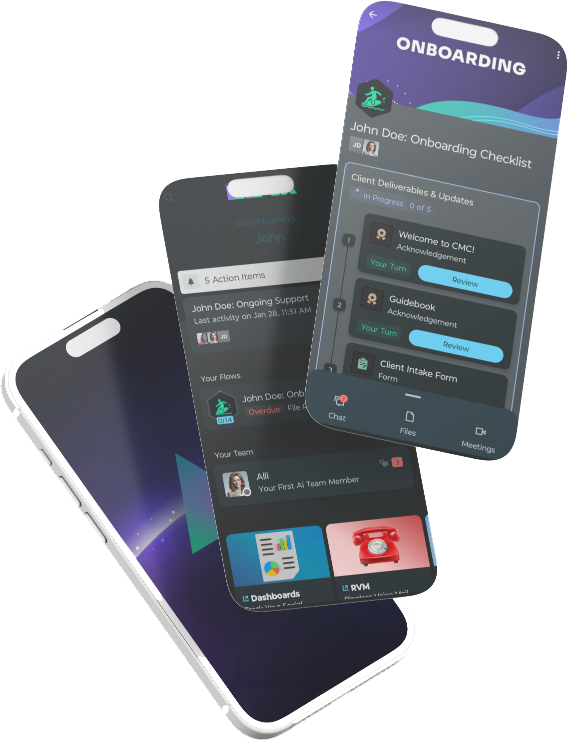
5 simple steps to get started
Our quick 5-step onboarding process guides you through a welcome message, a digital version of this guidebook, a short intake form, uploading your headshot, and connecting your social accounts, ensuring a smooth and seamless start.
- 1Welcome to CMC! Congrats on your decision to grow your business with CMC! We’re excited to have you on board. Simply check off this step to get started, and you’ll move on to the next part of the onboarding process.
- 2Digital Guidebook. This step provides a digital version of the Social Media Bootcamp Guidebook, the very guidebook you’re reading now! Keep this version handy for quick reference whenever you need it.
- 3Client Intake Form. Help us get to know your business better by completing this quick form. Your answers will ensure we tailor our services to fit your needs and goals. Plus, we need to know when to send your birthday cake! Every detail counts, providing this info helps us customize your experience and maximize your results.
- 4Upload Headshot. Please upload a clear, professional photo of yourself. We’ll use this in your personalized ads to help build trust and recognition with your audience!
- 5Connect Your Accounts. Use the link provided to securely connect your social platforms. This gives us the access needed to manage, optimize, and run effective marketing campaigns on your behalf. Once we have access, our creative team takes over, designing ads that keep your brand top of mind.

Stay top of mind with ease! Just a few simple steps, and you’ll be set up to keep your brand front and center.